Your passwords protected.
On your device.
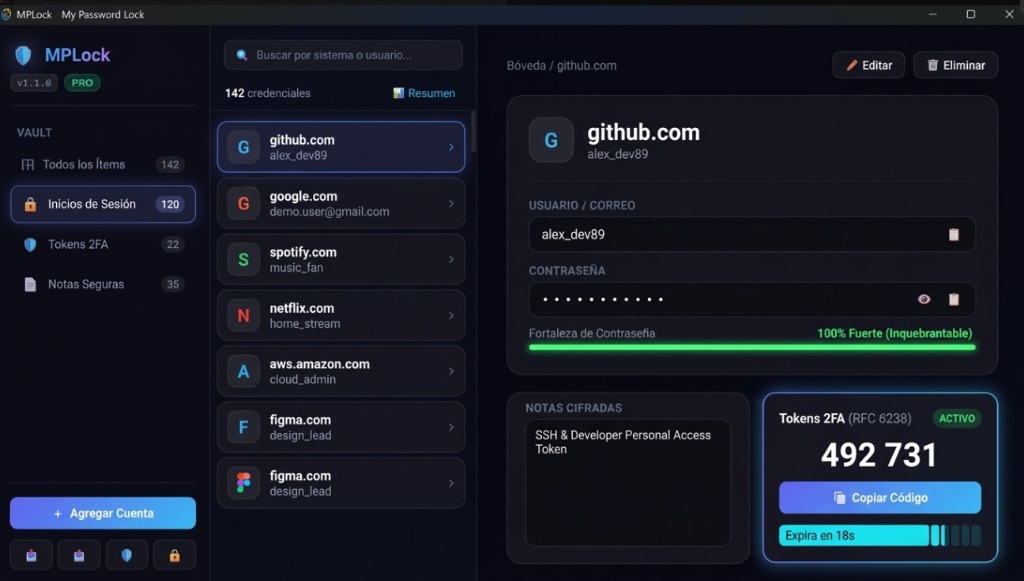
MPLock is a desktop password manager built in Rust for Windows. AES-256-GCM encryption, browser autofill, and built-in 2FA/TOTP codes. No mandatory cloud, no centralized vault in the cloud, and a single one-time payment for the 1.x series.
Why entrust your master keys to someone else's cloud?
Security incidents in cloud-based password managers have shown a fundamental reality: any centralized server is a permanent target for attackers.
Cloud Password Managers
Many cloud password managers store your encrypted vaults on third-party servers exposed to the internet 24/7, subject to metadata leaks and service outages.
-
×
Ongoing subscriptions.
-
×
If the provider suffers a breach, your encrypted vault files can be exposed to offline brute-force attacks on external clusters.
MPLock (Local-First)
Local digital sovereignty. Your vault file lives encrypted exclusively on your own hard drive. No packets containing your passwords travel over the network.
-
✓
One-time payment (Series 1.x): Buy once and receive all version 1.x updates without recurring fees.
-
✓
MPLock doesn't run a vault server, so nothing of yours is stored with us.
-
✓
Rust: sensitive buffers are overwritten with zeros on a best-effort basis (
zeroize).
Designed for privacy, built for speed
Every component of MPLock is designed to give you a smooth desktop experience while keeping your credentials on your machine.
Local-First & Encrypted Backups
Your credentials do not touch the internet. The vault file resides on your computer in an encrypted format. You can create encrypted backups (.mplockbackup) protected with their own password to transfer securely between your computers.
Smart Browser Autofill
Extensions for Google Chrome and Mozilla Firefox communicating via local Native Messaging to fill your credentials in one click.
TOTP / 2FA Authenticator
Generate time-based two-factor authentication codes directly inside each account entry. No need to reach for your phone every time you sign in.
AES-256-GCM Cryptographic Encryption
Key derivation via PBKDF2 with HMAC-SHA256 and 600,000 iterations as recommended by OWASP. Sensitive memory mitigation in RAM using zeroize.
Built with Tauri
Built with Tauri: a Rust backend with a web interface in WebView2, not Electron.
Secure Password Generator
Random passwords generated using operating system entropy (CSPRNG) rather than predictable patterns. Adjustable length and character complexity.
The local-first model
MPLock doesn't run a vault server, so nothing of yours is stored with us.
You can inspect the encryption engine, password generation, and license verification yourself: we publish mplock-core as open source under dual MIT/Apache-2.0 licenses on GitHub (the desktop application itself is closed-source and has not been independently audited).
Pay once.
No automatic renewals, no hidden fees, and no monthly charges to access your own data.
Free / Trial
Ideal for evaluating performance on your PC and testing the autofill workflow.
- Up to 15 saved credentials
- 14-day trial with Pro features
- Full AES-256-GCM encryption
- Browser autofill available during the trial and in Pro
- Secure password generator
- Encrypted backup (.mplockbackup) & import
Pro Lifetime
The unrestricted version for users who value digital privacy and local ownership.
- Unlimited credentials
- Unlimited autofill in Chrome and Firefox
- Use it on all your own personal devices (for example, your home desktop and your laptop)
- Built-in TOTP / 2FA authenticator
- Encrypted backups (.mplockbackup) & CSV export/import
- All v1.x updates included
- Offline license validation (Ed25519)
- Email support
- 14-day refund policy
Start using MPLock in seconds
Download the official v1.4.0 installer for Windows and start managing your credentials locally.
Download MPLock for Windows (.exe)Important Information Before Downloading
- Windows only: Developed exclusively for Microsoft Windows (Windows 10 and Windows 11, 64-bit). There are no versions for macOS or Linux.
- Interface language: The desktop app and the browser extension interface are currently in Spanish (an English interface is planned).
- Closed-source app with an open cryptographic core: The desktop application is closed-source, while its cryptographic core (
mplock-core) is open-source under dual MIT / Apache-2.0 licenses on GitHub. - Audit status: MPLock has not been independently audited by a third-party security firm.
- Unsigned installer (Windows SmartScreen): The installer is not code-signed with a commercial EV certificate, so Windows SmartScreen may show a warning on first run (see instructions below and in the FAQ).
- Independent developer: Built and supported by one person (Eddie Goudet, Chile).
Seeing the blue "Windows protected your PC" screen?
MPLock is an independent software project. The installer can be verified using the SHA-256 hash published on GitHub Releases, and the cryptographic core is open-source. This notice appears because the installer is not signed with a commercial EV code-signing certificate (which costs hundreds of dollars per year).
- Click the "More info" ("Más información") link on the Windows dialog.
- Press the "Run anyway" ("Ejecutar de todas formas") button to start the installation.
Browser Autofill Extensions
The MPLock extensions for Chrome and Firefox provide direct autofill on web forms (interface currently in Spanish, English planned). Official store links and installation steps:
Google Chrome / Edge
Chrome Web Store- Install the official extension directly from the Chrome Web Store using the link above.
- Open the MPLock app on your PC and autofill will connect via local Native Messaging.
Mozilla Firefox
Firefox Add-ons- Open the link to install the add-on in Firefox.
- Open the MPLock app on your PC and autofill will connect via local Native Messaging.
Frequently Asked Questions
Technical and commercial transparency from day one.
No. All information in your vault is stored exclusively on your own computer in a vault file encrypted with AES-256-GCM. MPLock does not operate servers to host passwords or collect telemetry on your accounts.
This is normal for independent software and does not mean MPLock contains malware. When downloading mplock_setup.exe directly from our official GitHub releases, Microsoft Defender SmartScreen may display a blue preventive screen stating that it is an unrecognized app.
This warning appears automatically because the installer is not code-signed with a commercial Extended Validation (EV) certificate (whose annual fees are high for independent projects) and is building download reputation on Microsoft's servers. Unlike applications from large corporations distributed through the Microsoft Store, directly distributed independent software goes through this routine prompt while building reputation.
MPLock's cryptographic core is open and can be inspected: its source code is available under MIT/Apache-2.0, it operates locally on your computer without telemetry or remote servers, and the mathematical details of its threat model are documented in our Cryptographic Architecture Whitepaper.
-
1
On the blue window titled "Windows protected your PC" ("Windows protegió su PC"), click the underlined link "More info" ("Más información").
-
2
File details will be revealed. Click the "Run anyway" ("Ejecutar de todas formas") button to start installation.
Microsoft Defender SmartScreen prevented an unrecognized app from starting. Running this app might put your PC at risk.
Interface language: The desktop application and the browser extension interface are currently in Spanish (an English interface is planned).
Source code & audit status: The desktop app is closed-source with an open cryptographic core (mplock-core, dual-licensed under MIT/Apache-2.0). MPLock has not been independently audited by a third party.
Support & development: MPLock is built and supported by one person (Eddie Goudet, Chile).
When you purchase your license, you receive an email with your receipt and your unique cryptographic activation key. If you misplace it, you can find it by searching for the purchase email in your inbox or by contacting us at mplocksoporte@gmail.com from the exact email address used for the purchase.
Yes. Your license is for your personal use, with no artificial device limit — activate it on as many of your own personal computers as you need (home desktop, laptop). There is no activation counter because there is no server tracking your usage; that is part of our local-first design.
No. MPLock is developed exclusively for Microsoft Windows (Windows 10 and Windows 11, 64-bit). There are no versions for macOS or Linux, and none are planned for the product.
If within the first 14 calendar days after your purchase you decide that MPLock does not meet your needs, you can request a refund by emailing mplocksoporte@gmail.com. Refunds are processed through Lemon Squeezy (Merchant of Record). When a refund is processed, the key is added to a revocation list shipped with a future app update; an installed version may keep working until then.
You can export your passwords in a generic CSV file with website, username, and password columns (and optionally notes and TOTP secrets), and import them into MPLock. Once imported, they are immediately encrypted locally with your master password. Note that for TOTP/2FA, MPLock strictly supports RFC 6238 with SHA-1, 6 digits, and a 30-second period; services requiring other parameters (such as SHA-256/512, 8 digits, or different periods) will not work.
Additionally, to back up your vault file or transfer it between your own computers, MPLock offers export and import in an encrypted backup format (.mplockbackup), protected with its own password using AES-256-GCM and 600,000 PBKDF2 iterations.
We use public-key cryptography with the Ed25519 algorithm. When you purchase a license, our licensing worker generates a digital signature with a private key. The MPLock app on your PC contains the corresponding public key and mathematically verifies that the signature is authentic without needing to connect to the internet.